

At a Glance
| What the crust is | Reaction products from vented hydrogen, acid, and the terminal metals |
| Color tell | White = lead sulfate/acid residue · blue-green = copper sulfate on copper clamps |
| Terminal tell | Negative post often = undercharging · positive post often = overcharging |
| Dangerous? | Caustic to skin and eyes; adds resistance that mimics a dead battery |
| Fast fix | Baking-soda paste, brush, dielectric grease |
| Root fix | Test the charging system (13.5–14.7V running, verify) |
Corrosion on a car battery is a symptom before it is a mess, and reading it correctly can save a needless battery replacement. This guide decodes the color and the terminal, ranks the 5 causes, and walks through cleaning it safely and keeping it gone.
Voltage figures and cost notes below are typical published ranges — confirm against your owner’s manual and a local quote.
Table of Contents
What actually is the corrosion on my battery terminals?
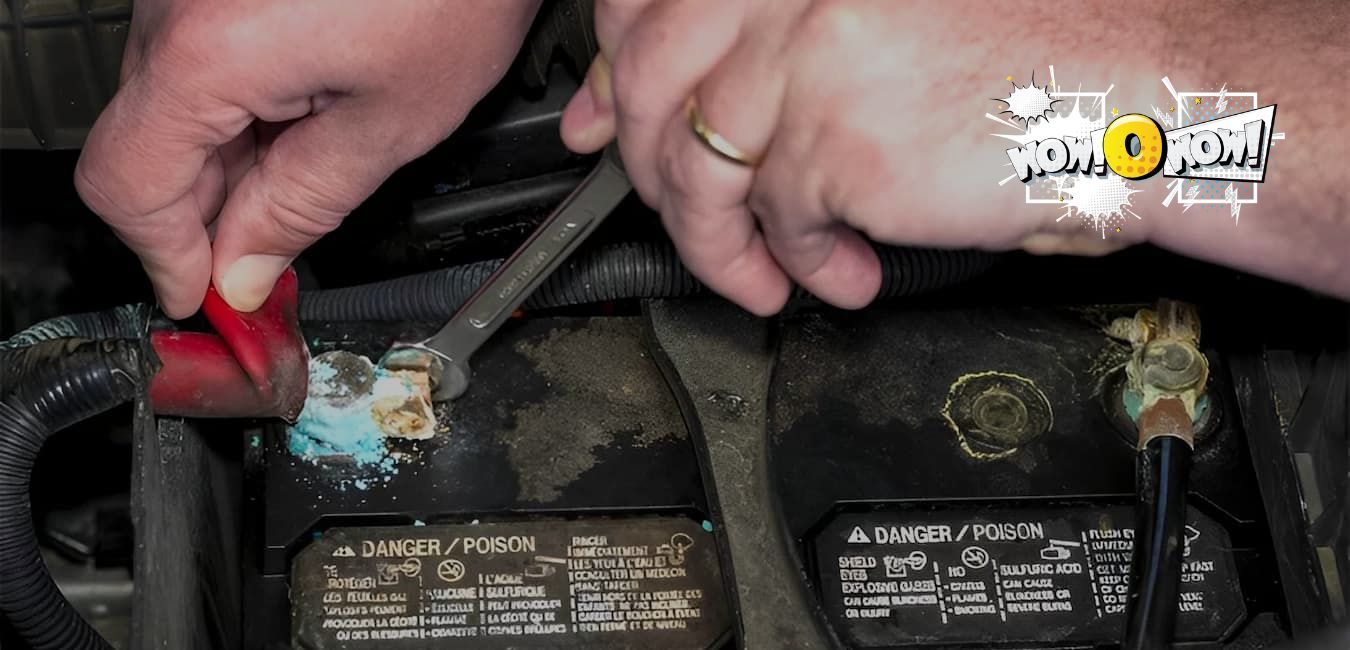
The crusty white, blue, or greenish deposit on battery terminals is a chemical reaction product, not dirt. A lead-acid battery vents small amounts of hydrogen gas and acid vapor in normal use, and that vapor reacts with moisture, the lead posts, and the metal clamps. The color names the metal involved:
- White, powdery crust — lead sulfate and dried acid residue, forming on and around the lead posts.
- Blue-green crust — copper sulfate, forming where acid vapor meets copper cable clamps and wire strands.
- Rusty brown flakes — plain rust on steel hold-down hardware, from moisture rather than battery chemistry.
Which terminal is corroded, and what does it tell you?
The corroded terminal is a diagnostic clue, because the two posts corrode for different reasons. Corrosion concentrated on the negative (−) terminal often indicates undercharging: a battery kept chronically low by short trips, long parking, or a weak alternator. Corrosion concentrated on the positive (+) terminal often indicates overcharging, usually a failing voltage regulator pushing the system past the normal 13.5–14.7 volt running range (confirm your vehicle’s spec). Treat the terminal tell as a tendency, not a verdict; confirm it with a charging-system test before replacing parts. The related failure paths are covered in what causes a car battery to die and whether a battery can die while driving.
What are the main causes of battery corrosion?
There are 5 main causes of battery terminal corrosion. They are overcharging, undercharging, battery age and electrolyte leaks, heat, and the reaction between dissimilar metals at the clamp. The table ranks each with its tell and its fix:
| Cause (ranked) | Where it shows / the tell | Fix |
|---|---|---|
| 1. Overcharging (failing voltage regulator or alternator) | Positive terminal; sometimes a hot battery or a rotten-egg smell | Charging-system test; repair the regulator or alternator |
| 2. Undercharging (short trips, long parking, weak alternator) | Negative terminal; slow cranking alongside the crust | Longer drives or a battery maintainer, then a charging test |
| 3. Age and electrolyte leaks (worn seals, cracked case, loose caps) | Corrosion all around; a wet or acid-stained battery top | Replace the battery; a leaking case is not cleanable |
| 4. Heat | Faster venting; crust that returns after hot months | Park shaded; test the battery yearly past year 3 |
| 5. Dissimilar metals plus moisture (copper clamp on lead post) | Blue-green crust on the clamps and cable ends | Clean, then dielectric grease or anti-corrosion washers |
Moisture accelerates every row, so a battery that has been soaked or pressure-washed corrodes faster. A hot, hissing, or visibly smoking battery is a different emergency covered in why a car battery smokes, and a sulfur stink while driving points to overcharging, covered in why a battery smells like rotten eggs.
Is battery corrosion dangerous or a problem?
Yes, battery corrosion matters in 2 ways. Electrically, the crust adds resistance at the connection, which causes hard starting, dim lights, charging problems, and intermittent no-starts that mimic a dead battery. Clean the terminals before condemning the battery or the starter. Physically, the deposit is caustic: it can burn skin and eyes and eat clothing, and the electrolyte behind it is sulfuric acid, listed as a corrosive by NIOSH’s chemical hazard guide. Corrosion rarely strands you on the spot, so it is safe to drive to a shop, but treat a car that cranks erratically as one dying connection away from a no-start.
How do I clean corrosion off a car battery?
Clean battery corrosion with a baking-soda paste and the correct disconnect order. Budget 20–30 minutes.
Caution: wear gloves and eye protection; the crust and the acid behind it burn skin, and the battery vents flammable hydrogen, so keep sparks and flames away, per OSHA’s battery-handling guidance.
- Put on gloves and eye protection before touching anything.
- Disconnect the negative (−) clamp first, then the positive (+), so a slipped wrench cannot short against the body.
- Mix a paste of baking soda and water. Spread it on the posts and clamps; the fizzing is the paste neutralizing acid.
- Scrub the posts and clamp interiors with an old toothbrush or a terminal brush until the metal shows.
- Rinse with a small amount of clean water and dry everything with a rag. Keep the solution out of the vent caps, because it neutralizes the electrolyte inside.
- Coat the posts with dielectric grease or fit anti-corrosion felt washers.
- Reconnect the positive (+) clamp first, then the negative (−), and tighten both until they cannot be twisted by hand.
Leave the job to a mechanic if a terminal or cable end is badly eaten away, if the case is cracked or leaking, or if the crust returns within weeks; fast-returning corrosion points to a charging fault that cleaning cannot fix. Verify the battery’s health afterward with the walkthrough in how to test a car battery.
How do I stop corrosion from coming back?
Stop corrosion from returning by fixing the root cause, not just the crust. There are 4 preventions that hold:
- Have the charging system tested; running voltage should sit near 13.5–14.7 volts (verify your spec), and anything outside it feeds the corrosion.
- Keep dielectric grease or anti-corrosion washers on the terminals after every cleaning.
- Keep the battery top clean and dry; dirt and moisture form a conductive, corrosive film.
- Replace a battery that is leaking or past the typical 3–5 year lifespan; an aging battery vents more.
FAQ
Does corrosion mean I need a new battery?
No, corrosion alone does not mean the battery is bad. The crust is usually cleanable and often points to a charging or connection issue rather than a failed battery. Replace the battery only if it is leaking from the case, past its typical lifespan, or fails a load test.
Why does corrosion keep coming back after I clean it?
Fast-returning corrosion means the underlying cause is still active. The usual suspects are overcharging from a failing voltage regulator, chronic undercharging from short trips, or an aging battery venting through worn seals. Have the charging system tested; cleaning treats the symptom, and the voltage test finds the cause.
Can I use Coca-Cola to clean battery corrosion?
Cola can dissolve some corrosion because it is acidic, but it leaves a sticky, sugary residue and does not neutralize battery acid. A baking-soda-and-water paste works better: it neutralizes the acid on contact, scrubs clean, and rinses away without residue. Save the cola for drinking.
Is battery corrosion harmful to touch?
Yes, battery corrosion is caustic. The deposit carries acid residue that can irritate or burn skin, damage eyes, and eat holes in clothing. Wear gloves and eye protection when cleaning it, avoid touching your face mid-job, and wash your hands when finished even if you wore gloves.
What to do now
Note the color and the terminal, clean the crust with a baking-soda paste, and then test the charging system so the corrosion does not return; the terminal tell plus a voltage reading turns a cosmetic annoyance into a finished diagnosis.
Caution: gloves and eye protection on, negative clamp off first. Have an ASE-certified technician run the charging test if the crust keeps returning. For testing, charging, and replacement in depth, see the complete car battery guide in our automotive hub.
